How to Count Words in Google Sheets?
Count Words in Google Sheets using basic formulas to count words in a cell, range, column, line break, and specific words.
Quick Summary
- Count words in one cell of a Google Sheet using LEN, TRIM, and SUBSTITUTE formula to get the accurate count of words when text contains extra spaces or blank cells.
- To add words in more than one cell, use a specific range like
A2:A1000in a SUMPRODUCT formula instead of an entire column to keep your spreadsheet quick. - For simple word-counting operations, the SPLIT formula is simpler, while for messy text, the
LENandSUBSTITUTEmethod tends to be more accurate. - A specific word, like “SEO”, can be counted by measuring the length of the text in the cell or range before and after the word is deleted.
- If your text contains line breaks, then use a formula to replace the line break
CHAR(10)with a space before you use the word count, so that each line will be counted in the final word count.
What Is the Best Formula to Count Words in Google Sheets?
The most common formula to count words in Google Sheets is:
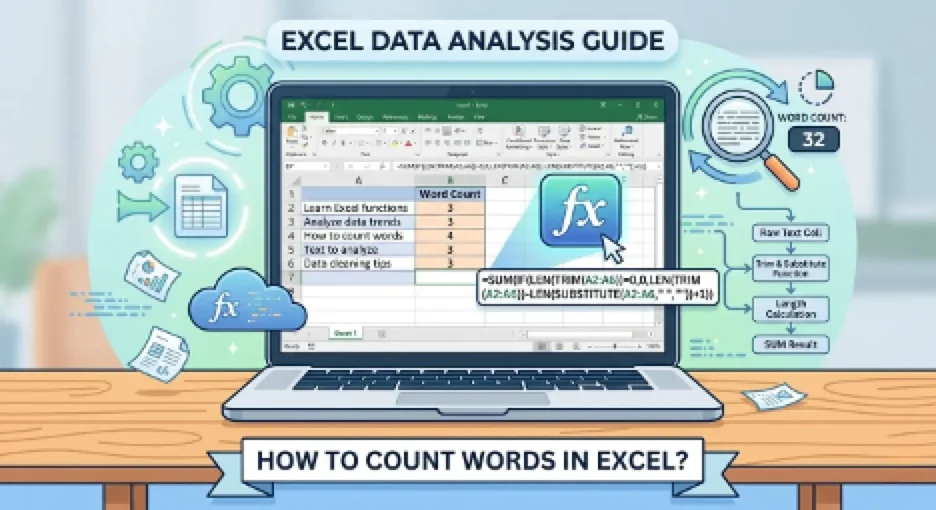
=IF(LEN(TRIM(A1))=0,0,LEN(TRIM(A1))-LEN(SUBSTITUTE(TRIM(A1)," ",""))+1)
The number of words in cell A1 is counted in this formula.
It does this by taking out unwanted spaces, counting the space between the words and adding another one to the word count.
For Example, if cell A1 contains:
Word Counting in Google Sheets is a breeze.
The formula returns:
6
I did test this formula in Google Sheets, with empty cells, single words, spaces and normal sentences. It seems to work best with regular text that uses spaces between words in the text.
How to Count Words in a Single Cell?
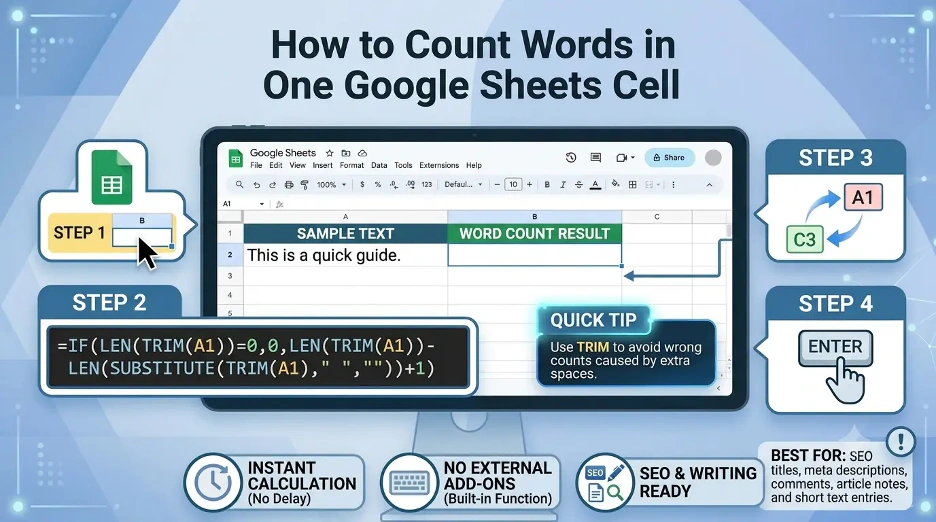
To count the words in one cell, follow this formula:
=IF(LEN(TRIM(A1))=0,0,LEN(TRIM(A1))-LEN(SUBSTITUTE(TRIM(A1)," ",""))+1)
How it works
TRIM(A1)strips out leading, trailing and multiple internal spaces.LEN(TRIM(A1))returns the length of the cleaned text, in characters.SUBSTITUTE(TRIM(A1)," ","")will remove all spaces in the text.- Google Sheets tells itself the number of spaces between words by reading the difference in the two character counts.
- 1 is added to change the number of spaces to the number of words.
- The
IFstatement will not allow blank cells to be counted as one word.
How to Count Words in Multiple Cells?
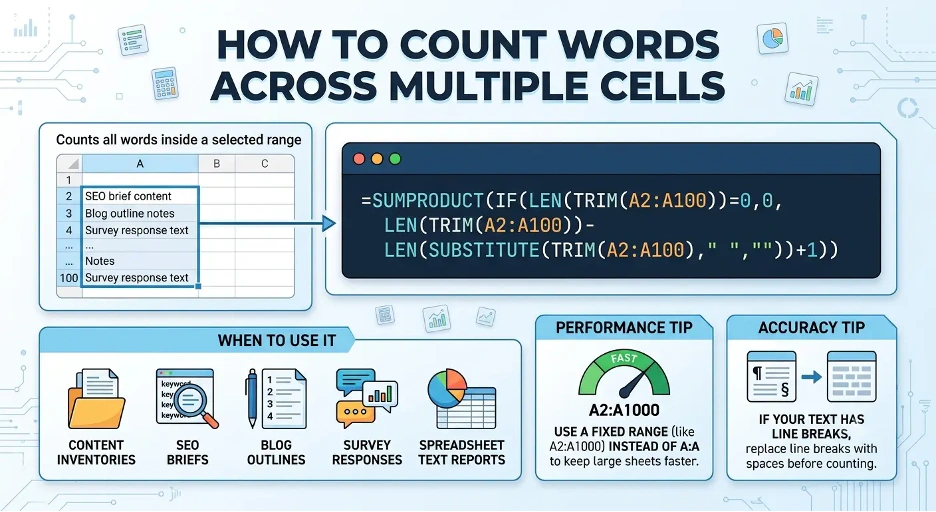
To sum all the words in several cells, use:
=SUMPRODUCT(IF(LEN(TRIM(A1:A10))=0,0,LEN(TRIM(A1:A10))-LEN(SUBSTITUTE(TRIM(A1:A10)," ",""))+1))
This formula sums the words in A1:A10.
Apply this when each cell is an entry of a sentence, paragraph, title, description, etc. This is the formula I use to analyze SEO titles, meta descriptions, article outline, comments, content inventory fields in bulk.
How to Count Words in an Entire Column?
COUNT to count words within a whole column:
=SUMPRODUCT(IF(LEN(TRIM(A:A))=0,0,LEN(TRIM(A:A))-LEN(SUBSTITUTE(TRIM(A:A)," ",""))+1))
In larger spreadsheets, however, the use of full-column references such as A:A can slow down the performance of the spreadsheet. Use a limited range for better performance:
=SUMPRODUCT(IF(LEN(TRIM(A2:A1000))=0,0,LEN(TRIM(A2:A1000))-LEN(SUBSTITUTE(TRIM(A2:A1000)," ",""))+1))
This is a more appropriate choice if data begins at row 2, and you know that your data is not going to exceed a certain value.
How to Count Words in Each Row?
If you want to count words for each individual row, enter this formula in B1:
=IF(LEN(TRIM(A1))=0,0,LEN(TRIM(A1))-LEN(SUBSTITUTE(TRIM(A1)," ",""))+1)
Then drag the formula down the column.
For example:
| Cell A | Cell B |
|---|---|
| Write better content faster | 4 |
| Google Sheets word count formula | 5 |
| SEO title ideas | 3 |
Useful if you have to have an individual word count for each title, description, comment, or reply.
How to Count Words in Google Sheets Using SPLIT?
Another way to count words in a cell is by using the SPLIT function:
=IF(A1="",0,COUNTA(SPLIT(TRIM(A1)," ")))
This formula will break the text into individual words and then count them.
It is easier to read than the LEN and SUBSTITUTE formula, but less flexible in dealing with unusual spacing or complex text. It is useful for most basic word count problems.
How to Count Words in a Range Using SPLIT?
You can count words across a range with:
=COUNTA(SPLIT(TEXTJOIN(" ",TRUE,A1:A10)," "))Combines all text in A1:A10 into one text string, then splits the text by spaces and counts the words.
This formula is easy to use and effective for small or medium-sized ranges.
How to Count Specific Words in Google Sheets?
Sometimes you may not want the word count. Rather, you can decide to tally the number of occurrences of a particular word.
For Example, to count the number of times the word “SEO” occurs in cell A1, type:
=(LEN(LOWER(A1))-LEN(SUBSTITUTE(LOWER(A1),"seo","")))/LEN("seo")The formula is not case sensitive, so it will treat “SEO,” “seo,” and “Seo” as the same.
Counting the word “SEO” over a range:
=SUMPRODUCT((LEN(LOWER(A1:A10))-LEN(SUBSTITUTE(LOWER(A1:A10),"seo","")))/LEN("seo"))It helps in keyword analysis, content audits, and for SEO optimization. This helps with easy checks for keywords, but I don't consider it to be a comprehensive SEO quality assessment as it only counts text matches.
How to Count Words Only If a Condition Is Met?
Words can be counted on another column when a condition is met.
For Example:
To count the number of words in column B, but only for rows in which the category is “Blog”, you could use the formula:
=SUMPRODUCT((A2:A100="Blog")*(LEN(TRIM(B2:B100))-LEN(SUBSTITUTE(TRIM(B2:B100)," ",""))+1)*(LEN(TRIM(B2:B100))>0))
This formula only counts words in B2:B100 if the corresponding row in A2:A100 is “Blog”.
Utilize this for editorial planning, content audit, campaign monitoring and categorization reporting.
How to Count Words Excluding Blank Cells?
Use: to count words but not blank cells.
=SUMPRODUCT(IF(LEN(TRIM(A2:A100))=0,0,LEN(TRIM(A2:A100))-LEN(SUBSTITUTE(TRIM(A2:A100)," ",""))+1))
This formula will not include empty cells as one word (which is a common error).
How to Count Words in Google Sheets with Line Breaks?
It's possible your cells have line breaks in them, and in many cases the basic word count formula might work, but it's better to normalize the text first.
Use this formula:
=IF(LEN(TRIM(A1))=0,0,LEN(TRIM(SUBSTITUTE(A1,CHAR(10)," ")))-LEN(SUBSTITUTE(TRIM(SUBSTITUTE(A1,CHAR(10)," "))," ",""))+1)
CHAR(10) represents a line break in Google Sheets. This formula will substitute line breaks with spaces prior to word count.
Best Formula for Most Word Count Tasks
The most popular Google Sheets word count formula for most users is:
=IF(LEN(TRIM(A1))=0,0,LEN(TRIM(A1))-LEN(SUBSTITUTE(TRIM(A1)," ",""))+1)
It is stable, it doesn't break when it encounters a blank cell, and it works well when used with standard text.
Use: For counting words in a range
=SUMPRODUCT(IF(LEN(TRIM(A2:A100))=0,0,LEN(TRIM(A2:A100))-LEN(SUBSTITUTE(TRIM(A2:A100)," ",""))+1))
There are two formulas that would be useful in most scenarios involving word counting in Google Sheets. In my experience the following formulas work best in regular space-separated text. The results may differ slightly depending on the spaces or line breaks that are hidden within the text copied from a PDF, website or document.
Interesting Research Facts
Full citations are in Sources below.
Google Sheets has evolved into an analytical tool
The early versions were primarily appreciated for their collaborative features, but later studies indicate that Google Sheets enables data queries, automation with Apps Script, and sentiment-analysis processes via functions such as the built-in QUERY function.
Text-heavy sheets need limits for performance
When performing automated text/sentiment analysis, researchers suggest limiting the number of raw texts to prevent processing lag and to keep the spreadsheet files from being too large.
Large text datasets should be split for stability
In cases of very large text archives, breaking the data down into individual spreadsheets would enable speed and stability when processing formulas.
Text analysis follows a structured workflow
Typically, text-as-data research entails data cleansing, transformation of raw text to structured variables, and statistical analysis, including frequency patterns or word counts.
Simpler formulas reduce spreadsheet errors
Previous studies of spreadsheet understandability reveal that complex references, conditional logic and nested formulas increase the difficulty of maintaining and error-proneness of spreadsheets.
Frequently Asked Questions
1. Is there a word count function in Google Sheets?
No. Google's built-in word count feature is available in Google Docs, but not in Google Sheets. When working in Sheets, I use the formula to count words within cells or ranges.
2. How to count words in a single cell in Google Sheets?
Use this formula:
=IF(LEN(TRIM(A1))=0,0,LEN(TRIM(A1))-LEN(SUBSTITUTE(TRIM(A1)," ",""))+1)
Counts the number of words in cell A1 and doesn't count a blank cell as one word.
3. Why am I getting the wrong answer from my word count formula?
Typically, this is due to some additional spaces, line breaks, or hidden characters in the text. I would use TRIM in the formula as it will get rid of any extra spaces before it counts.
4. How many times does the word appear in Google Sheets?
Yes. To count a particular word, you can use the difference in the length of the text before and after the word is removed. This is great for performing simple keyword checks, product names, tags or repeated terms.
5. Is it possible to count words across several cells or the whole column?
Yes. Count words through a range using SUMPRODUCT. I would like to use a fixed range, say A2:A1000, as opposed to a full-column range A:A.
How we reviewed this article:
Share this article