How to Count Words in LaTeX or Overleaf?
Count words in LaTeX and Overleaf with TeXcount: including included files, sections, captions, references and accurate counts.
Quick Summary
- If you're working within an Overleaf project, I recommend using the Word Count tool that is built into Overleaf, which is based on TeXcount.
- The advantages of TeXcount over a standard word counter are that it knows about LaTeX commands, equations, citations, headings and included files.
- For local LaTeX projects, I recommend to use
texcount -inc -sum main.texwhich counts the main file and the included files, and then displays a clean total. - Word counts are approximate, and may vary from one format to another of captions, footnotes, tables, equations, appendices, and references.
- When you are ready to submit your paper, thesis, or report, always check your paper's word count process against the proper process outlined in your journal or university or conference requirements.
Why Is Word Count in LaTeX Different?
This is not a plain text file. It contains marking like:
\section{Introduction}
This paper analyzes the effect of...
\cite{smith2024}
\begin{equation}
E = mc^2
\end{equation}
The simplest word counter can count words, such as the commands \section, \cite, or \begin{equation}. That results in false data.
A word counter for the LaTeX format should:
- Count actual prose
- Ignore most formatting commands!
- Handle headings correctly
- Treat equations separately
- Recognize included files
- Manage citations, captions, footnotes and bibliographies from adherence to chosen settings.
That's why TeXcount is typically the preferred tool. I like TeXcount, as it can deal with LaTeX better than a normal word counter, and ignores most of the commands as regular words.
Method 1: Count Words in Overleaf
Count Words in Overleaf for this assignment.
There is no need to install anything as Overleaf has a built-in word counter.
To count the words in Overleaf, follow the steps below.
- Click Open your Overleaf project.
- Be sure that the main
.texfile is the one you want to select and compile. - On the upper left corner click Menu.
- Select Word Count.
- Overleaf will run TeXcount and show the word count report.
The report typically contains the word count and counts of each heading, text, math and other document elements. When working on Overleaf, the Word Count tool in Overleaf is the recommended choice since it runs TeXcount on your project.
Important Overleaf Word Count Notes
Word Count is provided in Overleaf by TeXcount. It counts the main file and files included by means of commands like:
\input{chapter1}
\include{chapter2}
The ideal structure for your main.tex file is to be in a folder at the top level of your Overleaf project, rather than in a subfolder.
For Example, this is the suggested structure:
main.tex
chapters/introduction.tex
chapters/methodology.tex
references.bib
This structure can cause problems with the built-in word count, when the main document is not in the project root:
src/main.tex
chapters/introduction.tex
references.bib
Method 2: Use TeXcount Locally
TeXcount can be used from the command line if you're working with LaTeX on your computer.
Basic TeXcount Command
This command is in the folder containing your principal .tex file:
texcount main.tex
This will provide a detailed word count of the file.
Get Only the Total Word Count
You can use this to display only the total count:
texcount -sum main.tex
This can be helpful when you are just looking for the last digit.
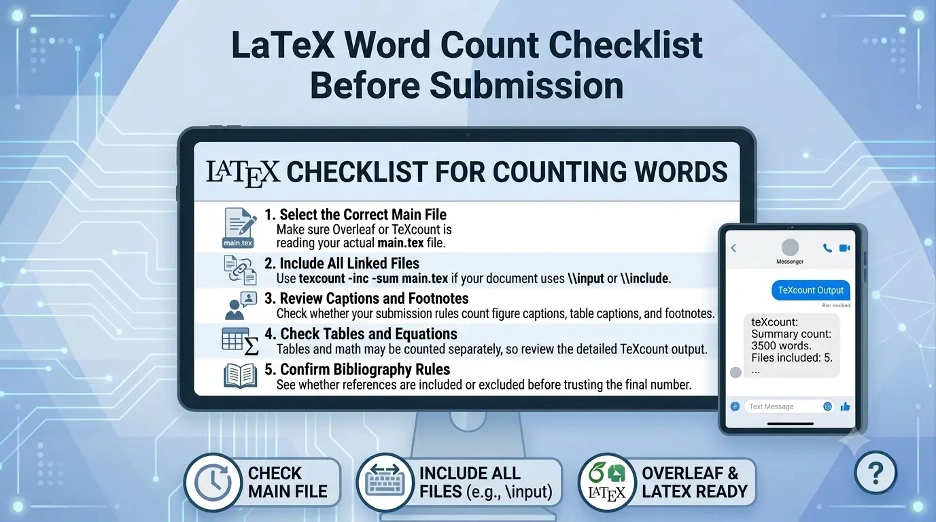
Count Included Files
Use: if your project incorporates \input or \include.
texcount -inc main.tex
To get the number of files included, and return just that, use:
texcount -inc -sum main.tex
This is one of the best commands to use for theses, dissertations, reports, and multiple file research papers. I use a local Texcount in case I want more control, for example, if the document is long and there are chapters, references, captions, or included files.
Method 3: Count Words in a Specific Section
If you only need to count words in the abstract, introduction, conclusion or a specific chapter, you can proceed to skip the rest of the book.
The easiest way is to separate that part out into a separate file and run TeXcount on it.
For example:
abstract.tex
introduction.tex
methods.tex
results.tex
Then run:
texcount abstract.tex
Or:
texcount -sum abstract.tex
This will provide a purer word count for each section of the paper.
Method 4: Count Words Excluding Bibliography
A lot of journals, universities and conferences don't count references as part of the word count.
The bibliography file will not count towards the page count, and typically you can exclude it by omitting the .tex file.
Use:
texcount -inc -sum main.tex
If your bibliography is being counted unexpectedly, then do not forget to ensure that your references are entered by hand within the .tex file. A bibliography, if written in hand, can be considered as regular text.
Example:
\begin{thebibliography}{9}
\bibitem{smith2024}
Smith, J. Title of the article...
\end{thebibliography}
If your institution is not requiring references, make sure you ask if they should be omitted from the total count or included separately.
Method 5: Count Captions, Footnotes, and Other Elements
Every submission guideline tallies different elements. Some have captions and footnotes. Others exclude them.
The number of Texcounts in a document may be customized, but it will depend on the structure of the document and options selected.
Some factors that can influence your count are:
- Figure captions
- Table captions
- Footnotes
- Abstract
- Appendices
- Bibliography
- Equations
- Display math
- Section headings
- Author affiliations
- Tables
Always check your word counts against the rules of your journal, conference or university before you submit.
How to Add Word Count Inside an Overleaf PDF?
Some users would like to see the word count in the compiled PDF. This can be achieved using shell escape to run TeXcount, but is not necessarily available in all LaTeX environments.
One of the common methods is:
\immediate\write18{texcount -sum main.tex > wordcount.txt}
\input{wordcount.txt}
But for this, the shell escape should be enabled. In many instances, it is better to include the word count in the Word Count tool on Overleaf, or compute it yourself, using TeXcount, rather than adding it to the PDF file.
A manual word count report is more secure and convenient to verify for the majority of academic submissions.
Best TeXcount Commands for LaTeX Word Count
The following are some of the most useful commands:
Count one file
texcount main.tex
Count total words only
texcount -sum main.tex
Count main file and included files
texcount -inc main.tex
Count included files and show total only
texcount -inc -sum main.tex
Count a specific chapter or section file
texcount chapter1.tex
Save word count to a text file
texcount -inc -sum main.tex > wordcount.txt
This will be helpful when you have to submit a word count proof.
Why Does Your LaTeX Word Count May Look Wrong?
The word count of a LaTeX paper may be different when counted by different tools and with different settings. If your word count is at the extremes, review the following reasons to understand why.
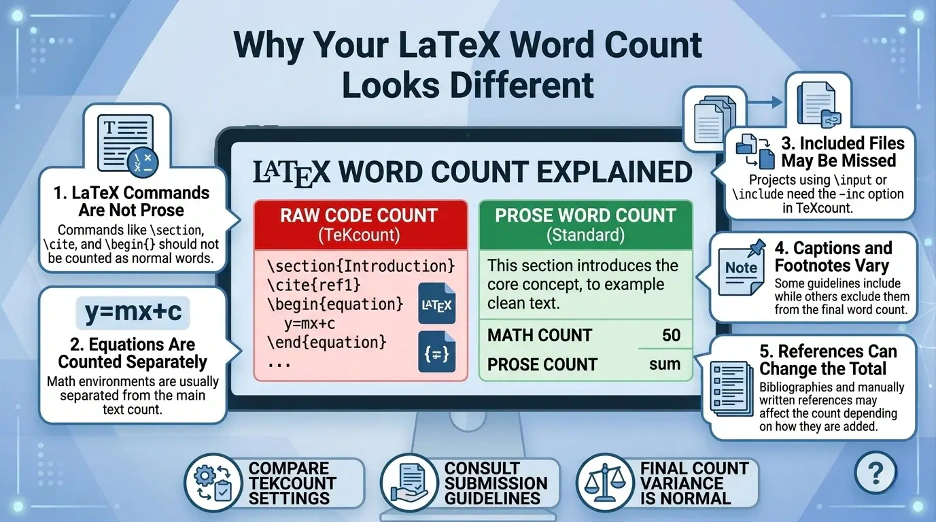
1. Included Files Are Not Being Counted
When you are working on your document and it includes any other files in the form of \input or \include, be sure to use the -inc option locally:
texcount -inc -sum main.tex
In the Overleaf editor, ensure that your main file is properly set up and at the top-level of the project.
2. Tables Are Counted Differently
The number of times a text appears within a table may not always be the same as you'd expect. There are some tools which render the content of tables as floating content, others render tables as regular content.
If the text in your table is important for your submission, then do look at the detailed output of TeXcount instead of just the total.
3. Equations Are Not Counted as Normal Words
Mathematical expressions are typically counted separately from prose, unless they are embedded within prose. Unless embedded in prose, mathematical expressions are usually counted separately from prose.
For example:
\[
E = mc^2
\]
This is not to be used as a sentence in the main text.
4. Citations Can Affect the Count
The following commands are called citations:
\cite{smith2024}are not typically classified as “regular words” as in typed text. However, there are a number of potential pitfalls of manually written references.
5. Comments Are Ignored
The typical way to start a comment in LaTeX is with a %:
% This is a comment
Word counts are not required to include comments.
Recommended Method
The simplest way is for most Overleaf users to:
Menu → Word Count
If you are a local user of LaTeX, the best command is:
texcount -inc -sum main.tex
This includes the main file as well as any included files and returns a clean total. This is a guide for a student, a researcher or any academic writer who require a practical approach to word counting in LaTeX or Overleaf without having to use a simple word counter that may confuse the counting of LaTeX commands.
Interesting Research Facts
Full citations are in Sources below.
Minimalist word counters reduce distraction
Clean word counters help writers stay focused without the distraction of pop-ups or notifications. Basic metrics such as word count can enhance user satisfaction and minimize task aversion.
Modern word counters are becoming AI-powered
Recent AI models are more precise in extracting tone, sentiment, themes and readability. In 2026, a good word counter should be able to not only count words but comprehend the text.
Headline word choice affects click-through rates
Word choice of headlines impacts engagement at scale. For every additional negative word in an average length headline, CTR went up by 2.3%.
Text length supports deeper engagement
Longer, more detailed writing tends to indicate more depth, effort, and coverage of topics. The word count can be used to meet content-length requirements.
Typing speed helps estimate writing time
A proficient typist can typically type around 38–40 words per minute. Word counters that feature the words 'time to write' or 'time to read' can aid in planning.
Frequently Asked Questions
1. How can you know how many words are in a LaTeX and Overleaf file?
Typically Overleaf's Word Count will only consider the primary LaTeX text and won't always account for bibliography entries the same way as in normal prose. Manual typing of the references inside the .tex file may influence the count.
2. Is there any way to exclude captions and footnotes from TeXcount?
It is possible to count captions and footnotes using Texcount, but this will depend on the document structure and settings. If captions or footnotes are important for your submission, I strongly recommend you to view the detailed TeXcount report.
3. Why is the number of words on Overleaf different to the number of words in Microsoft Word?
Overleaf supports the use of TeXcount, a program that understands LaTeX commands, equations, citations and formatting. Microsoft Word will recognize plain text differently, which may result in differing results.
4. How to count the words in included files?
Use this command: The answer is main.tex using the texcount -inc -sum main.tex command. If you add files with \input or \include, you can use the -inc option to tell TeXcount to include them.
5. In LaTeX, are the equal signs included in the word count?
No, normally equations do not count as normal text. This is one of the reasons why word counts are sometimes different for LaTeX documents than for a simple word counter.
6. May I use just a chapter or just a section?
Yes. It is easiest to save the chapter or section in a separate file called .tex and run: texcount -sum chapter1.tex
7. Is TeXcount counting words in the tables?
In some cases, the text in tables is not covered by the main prose count. If count of table text is part of your word count, look at the detailed TeXcount output, rather than the word count.
8. Is it possible to display the word count in a PDF?
Yes, but it may need shell escaping and additional set up. I would suggest that for most people, the Word Count tool in Overleaf or a TeXcount report saved separately is the best option.
9. Which is the best command to use with the most projects in LaTeX?
For the majority of projects I use: The command for the input file is: texcount -inc -sum main.tex It includes the main file, links in your files and provides a neat complete total.
10. What causes the word count to be different?
Most frequently these are included files that are missing, counted captions, ignored comments, handling of equations and tables or excluded bibliography.
How we reviewed this article:
Share this article