How to Count Words in Notion
Discover how to view the word count in Notion, how to get to it, what it encompasses, and how to count text and database items you choose.
Quick Summary
- The word count feature is built into Notion, but only in the three dots page menu, not while in the main editor.
- Useful for drafts, essays, notes, reports, and content briefs since it displays the total words on the current Notion page.
- Notion will not display a real-time word count while you write, but instead require you to go into the page menu every time you wish to view it.
- Selected text will not be counted by Notion, and must be copied to Google Docs, Microsoft Word, or a word counter application.
- To track word count and progress, as well as compare current words with goals for writing and for databases, you can use a simple tracker or a formula.
Does Notion Have a Word Count Feature?
Yes, there is a word count feature on the pages of Notion. Displays the word count of a Notion page from the page menu. I went and looked at this in Notion, and the word count is listed at the bottom of the three-dot page menu.
This is useful for:
- Blog drafts
- Essays
- Reports
- Meeting notes
- Scripts
- Documentation
- Long-form writing
- Content briefs
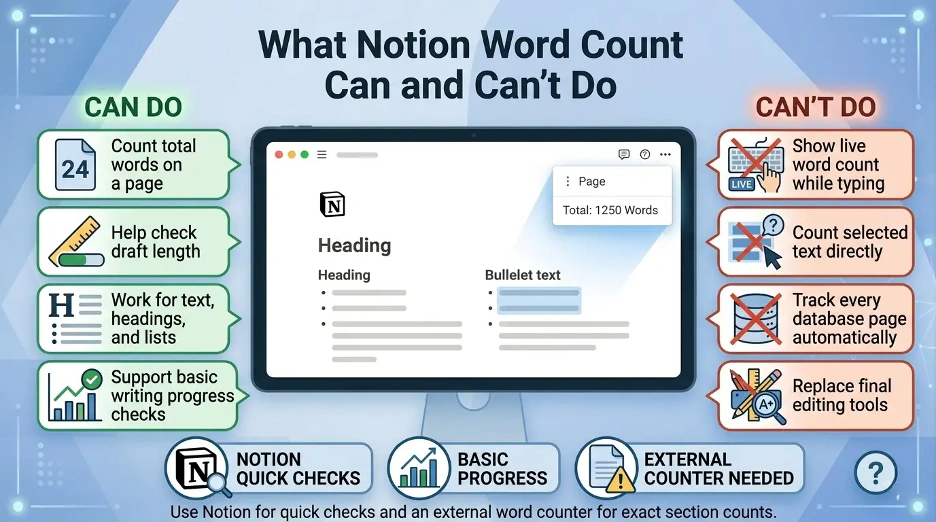
Notion, however, has its own word counter which works on the basis of pages. Does not display real-time word count when typing; does not allow for word count of only selected text within the editor.
How to Count Words in a Notion Page?
The easiest method to test word reliance in Notion is to use the page choices menu.
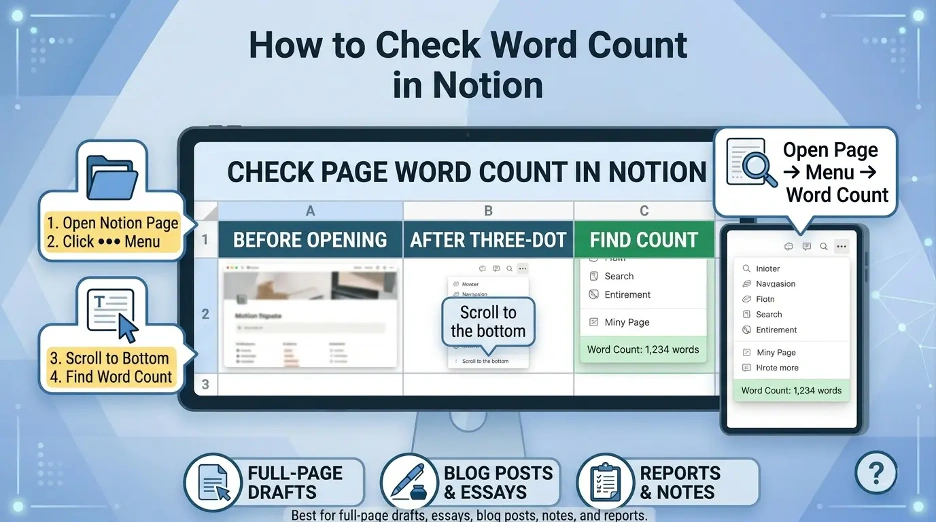
Follow these steps:
- Open the Notion page you wish to view.
- Tap the three dots on the top right of the page.
- At the bottom of the menu, scroll down.
- You will see the word count near the bottom.
The number indicates the total number of words on the current page in Notion. I found it to be at work, as a normal writing page in Notion does the same thing.
Where Is the Word Count in Notion?
The word count for the Notion can be found in the page settings menu. Does not come pre-loaded on the main editor.
The three-dot menu typically contains settings like page styling, font size, locking the page, export, move to and other page settings. You can see the word count at the bottom of this menu.
If it doesn't pop up as soon as you click, scroll down to the bottom of the drop down.
What Does Notion's Word Count Include?
Notion records the number of words on the current page. Typically this means the main text sections within the page, including:
- Paragraphs
- Headings
- Bullet lists
- Numbered lists
- Quotes
- Toggle text
- Callout text
This number might be different for your page, depending on its format. For instance, embedded content, linked databases, formulas, or synced blocks might not operate as expected when compared to traditional written text.
The built-in word count is generally sufficient for most writing requirements to check the word count of a draft, article, essay, or note. Based on my testing, Notion's word count is best suited for pages that have primarily plain text, headings, and lists.
Can You Count Words in Selected Text in Notion?
The word count feature for selected text isn't yet available in Notion. Highlighting one paragraph or section will not reveal a separate count for that highlighted section of Notion.
If you wish to count words only on a specific part of a Notion page, you can use any of these workarounds:
- Click and select the text you want to copy, and then click and paste it into a word counter.
- Copy and paste the part into Google Docs or Microsoft Word.
- Transfer that section temporarily to another Notion page and see how many words are on the page.
- Select the desired browser extension to count selected text words.
The quickest way to do this is to copy and paste the section you want to count into a dedicated word counter. When I want to know the word count for just one part, I will commonly copy and paste that part into an external word counter.
How to Count Words in a Notion Database?
The number of words in a Notion database will vary based on the desired metric.
If every database item is a full page, then open the item and choose from the three dot menu to show the number of words on the page.
You can use a Notion formula to approximate word count for a text stored as a database property, like a text field.
For example: One formula method is to add one to the number of spaces. If this is the case and your text property is named Content, a formula such as this can be used:
if(empty(prop("Content")), 0, length(replaceAll(prop("Content"), "[^ ]", "")) + 1)This formula is an approximation based on spaces. This is good for straightforward text and might not work as well for text with unusual formatting or punctuation problems, line breaks, or extra spaces.
To get better word tracking in the database, your text should be clean and avoid multiple spaces between words.
How to Track Word Count Goals in Notion?
But if you are using Notion to write, you might need more than just a single word count. Consider monitoring progress in writing over time.
These are the properties you can use to build a simple word count tracker in a Notion database:
- Title
- Draft type
- Target word count
- Current word count
- Remaining words
- Status
- Deadline
For example, You can include a formula property for remaining words:
prop("Target Word Count") - prop("Current Word Count")Alternatively, you could set up a progress percentage:
round((prop("Current Word Count") / prop("Target Word Count")) * 100)It works well for bloggers, students, authors, content marketers and anyone who has word count goals.
How to Count Words in Notion on a Desktop?
On the desktop, click on the Count menu item.
- Go to the Notion desktop app or the web.
- Open the page that you wish to review.
- Tap the three dots in the upper right corner.
- Go to the bottom of the screen.
- View the word count.
It's the same whether you're using the Notion desktop app or Notion in a browser.
How to Count Words in Notion on Mobile?
It might be easier to count on the desktop version than the mobile version of Notion. The mobile app interface is less cluttered and some page options may be less obvious.
To check the word count on mobile:
- Open Notion app.
- Open the page you wish to check.
- Tap the page options menu.
- Check the word count in the page settings area.
If it is difficult to see the word count from a mobile device, click on the same page on the desktop for a faster count.
Best Ways to Count Words in Notion
It will depend on your objective.
- Use Notion's built-in word count in the 3-dot menu for a full Notion page.
- To copy the selected text to an external word counter.
- Use a formula based estimate for database text properties.
- When creating goals, use a database tracker to record target word count, current word count, and progress formulas.
- If you are using live word count, then you should use an external word counter tool or extension for your browser.
Tips for Managing Word Count in Notion
- Work on drafts on different pages. This makes the built-in word count more user-friendly.
- Use headings for long sections of text. This will assist you to copy and count sections if required.
- If you're working on several writing projects, use a database. Use target word count and status properties to monitor progress.
- Do not use more than a few embedded blocks in writing pages. The plain text blocks are more easily programmed for count and are easier to manage.
- When you need to edit for publication or to provide statistics with exact formatting or grammar, move your content into a dedicated editing or writing tool.
I use Notion's word count feature for quick draft checks, but if I need an exact word count, I use a word counter tool or Google Docs or Microsoft Word.
Interesting Research Facts
Full citations are in Sources below.
Mobile readability
The number of characters per line on the screen is recommended to be between 60 and 75. Wider layouts can decrease reading comfort and reading speed.
Source: Mobile readability
Typing speed benchmarks
Based on large-scale typing data, the typical digital typing performance is at the 50 WPM level, and the more advanced users can surpass this.
Source: Typing speed benchmarks
Cognitive load in digital reading
Long, unstructured hypertext cause cognitive load. Use headings, blocks and sections to enhance retention.
SEO and long-form content
A longer, well-structured format may help achieve greater search results, backlinks and topical depth.
Source: SEO and long-form content
PKM and writing metrics
Word count, notes, and output tracking for PKM promotes self-monitoring, productivity, and knowledge management.
Source: PKM and writing metrics
Frequently Asked Questions
1. Is there any word count feature in Notion while typing?
No, Notion does not have a real-time word count. The total page word count can only be checked in the three-dot page menu.
2. Is there a way to count words in just part of a Notion page?
Not directly. I will typically select the section and copy it into a word counter, Google Docs or MS Word.
3. Why can't I see the word count in Notion?
The word count appears not in the main editor. Click the three-dot menu in the upper right corner and scroll to the bottom of the page.
4. Is it possible for word count to be a database property within Notion?
If the text is contained in a database property, then you can estimate it using a formula. All words will not be automatically counted inside the full page body in Notion.
5. Is Notion good for tracking writing goals?
Yes, Notion is a great option for writing goals, however, it is best suited for a simple database where the current word count, target word count, deadline and progress formulas are entered manually.
How we reviewed this article:
Share this article