How to Count Words in a PDF File?
Understand how to accurately count words in PDF with Word, Google Docs, online PDF word counting tools, OCR, and more.
Quick Summary
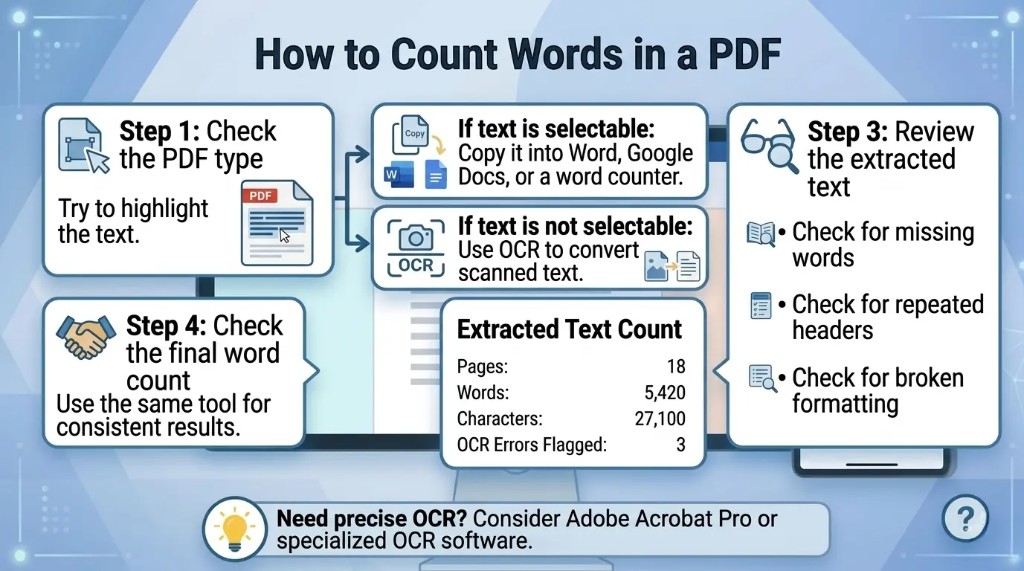
- Try to highlight and copy the PDF text to see if it's possible; if it is, the PDF is text based and easier to count. Otherwise, it is probably scanned and requires OCR software.
- For a dependable count, use Microsoft Word: Open the PDF in Word and then allow Word to convert the PDF; then use the Word Count tool under the Review tab.
- For a free alternative, upload the pdf to Google Drive, open it with Google Docs, and click on Tools and then on Word count.
- For scanned PDFs, OCR is required: Scanned PDFs contain images, so if you want to count words you need to convert the images into text using OCR.
- Always check the text before relying on the number of words.
What Is a PDF Word Count?
- A PDF Word Count is a word count of the text within a PDF document. PDF Word Count refers to the amount of words in a PDF file.
- It typically contains body text, headings, captions, footnotes, tables and may include headers and/or footers, depending on the tool's capabilities.
- If not, I assume a PDF word count to be an approximation until I've personally counted the words in the extracted text.
- The final number may vary depending on the tool, due to headers, footers, tables, footnotes.
- The word count results may differ slightly between the tools, depending on their processing of punctuation, numbers, words hyphenated to more than one word, tables, and scanned text.
Why Counting Words in a PDF Can Be Difficult
PDFs contain a wealth of information, and this is why counting words in a PDF can be challenging. Not all PDF files are created in the same manner. Some PDF are exported fromWord, Google Docs, InDesign etc. applications. These are typically text with selectable options. Other PDFs are scanned from paper – these are actually stored being a photo or picture.
The main challenges are:
- This is because scanned PDFs, without OCR, will not have a readable text in them.
- There are PDF files containing text in an intricate layout.
- The total may be altered by tables, footnotes, headers and captions.
- PDFs that are password-protected may not be copied or exported.
- Formatting or special characters may be misinterpreted by some online tools.
First, determine if it is possible to select and copy text from the PDF before deciding on a method. If you are able to click on the words with your cursor, the PDF does have text. If you can't choose the words, this is probably a scanned PDF. I look to see if I can highlight and copy the text. If I cannot choose the words, the PDF is most likely to be scanned and should be OCR'd first.
Method 1: Copy and Paste the PDF Text into a Word Counter
A simple but effective method of word counting for a PDF document is to copy the text and enter it into a word counting program. This is a good method for short PDFs as it is simple and fast. I always look at the text pasted to check it is complete without repetition (before believing the outcome).
Steps
- Open the PDF file.
- Click on the part of the text to count.
- Select to copy.
- Copy and paste it into an online word counter, Microsoft Word, Google Docs, or any other word processor.
- Review the word count.
Method 2: Count Words in a PDF Using Microsoft Word
The Microsoft Word application can open a lot of PDFs and can convert them into editable formats. After the conversion you may use Word's word count feature. Many PDFs with text content I like better in Microsoft Word, since it provides a word count. When the file contains tables, columns or complicated formatting, I still make comparisons between the converted document and the original PDF.
Steps
- Open Microsoft Word.
- Click File.
- Select Open.
- Choose the PDF file from your device.
- Word will show a message appearing that it will convert the PDF to an editable PDF.
- Click OK.
- Once the file has opened up, click on Review.
- Click Word Count.
Microsoft Word will display the page, word, character, paragraph and line counts.
Method 3: Count Words in a PDF Using Google Docs
You can count the words in a PDF using Google Docs too, particularly if the PDF is posted in Google Drive.
Steps
- Upload the pdf file to Google Drive.
- Right-click the PDF.
- Select Open with.
- Choose Google Docs.
- After opening the file, click on Tools.
- Select Word count.
- View the total number of words.
You can also use the shortcut:
- Ctrl + Shift + C on Windows
- Command + Shift + C on Mac
Method 4: Use Adobe Acrobat Pro to Export the PDF
Adobe Acrobat Pro does not always show the word count of the PDF, but you can extract the PDF into Microsoft Word and count the words there.
Steps
- Open the PDF in Adobe Acrobat Pro.
- Click Export PDF.
- Choose Microsoft Word as the export format.
- Save the converted document.
- Open the exported file in Microsoft Word.
- Go to Review.
- Click Word Count.
Method 5: Use an Online PDF Word Counter
When you upload a PDF to online PDF word counters, they automatically count the number of words in it. If you do not wish to install software, this is one of the quickest ways. If it's a non-sensitive file, I only use this sort of PDF word counter online. Where the document is private, legal, financial or business I like to use “offline tools”.
Steps
- Search for an online PDF word counter.
- Upload PDF file.
- Allow the processing of the document to run by the tool.
- Please check the word count that the computer returned.
- Download or copy data as appropriate.
Method 6: Use OCR for Scanned PDFs
If your PDF is scanned, some word-counting software won't count the words. If you do, you'll need what is known as Optical Character Recognition (OCR). OCR is the ability to convert a scanned image of text into machine-readable text. If I utilize the OCR, I always verify the text recognized before counting. If the page is not centered or tilted, the words may be lost or be incorrect.
Steps
- Open the scan PDF in OCR software.
- Perform OCR on the document.
- Recognized Text: Export to Word, Google Docs, or plain text.
- Apply word count in your editor of choice.
The most common OCR software includes Adobe Acrobat Pro, Google Drive, ABBYY FineReader, Microsoft OneNote, and online tools.
For Example: If I can highlight and copy text in a PDF before I count words in it. When the text can be selected, I use Word or Google Docs. If not selectable, I take the photos of it, and then use the OCR to get a more accurate count.
Method 7: Count Words in a PDF on Mac
To count the words in PDF on Mac, one can copy the text from the Preview app into Pages, TextEdit, Microsoft Word or use an online word counter.
Steps Using Preview
- Open the PDF in Preview.
- Select the text.
- Copy the text.
- Copy it, and paste it into a word counter.
- Verify word count.
There is no built-in word count associated with Preview, so you'll have to use another application to determine the word count.
Method 8: Count Words in a PDF on Windows
You can count the words in a PDF on Windows by using Microsoft Word, Adobe Acrobat, Google Docs or an online PDF word counter.
Quick Option
- Right-click the PDF.
- Open it using Microsoft Word.
- Allow Word to convert the file.
- Click Review.
- Select Word Count.
This is typically the quickest way for Windows users to get online who may have Microsoft Word installed.
Which PDF Word Count Method Is the Most Accurate?
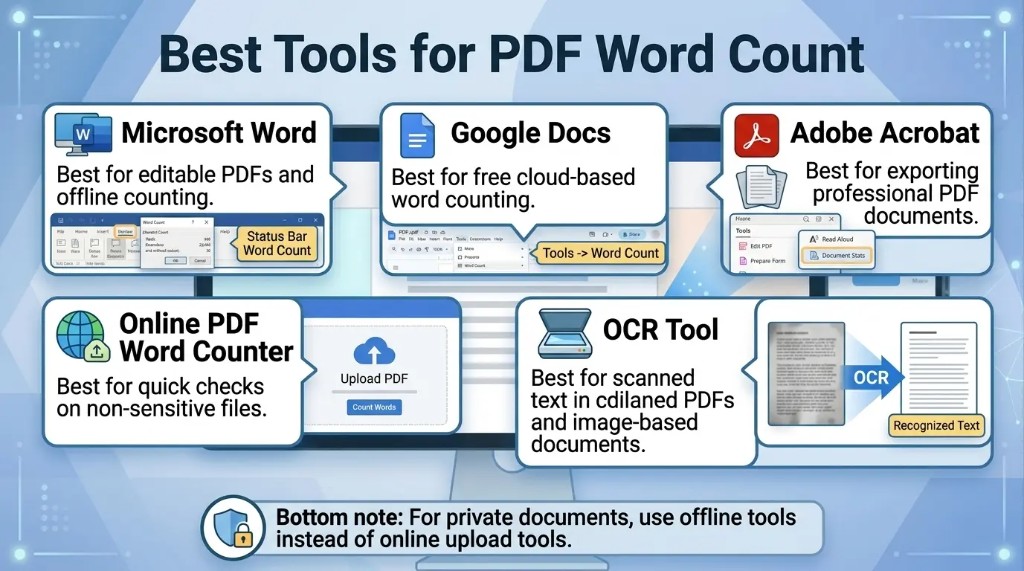
The best approach to it is through the document type. If you are dealing with a PDF where the text is the only thing, you should be able to rely on the Word Count feature of Microsoft Word to get a good estimate of the word count. If a PDF is scanned, it must be OCRed before word counting can take place. If it's a simple file, you might be able to copy and paste into a word counter.
Here is a practical comparison:
| Method | Best For | Accuracy |
|---|---|---|
| Copy and paste | Short text-based PDFs | Good |
| Microsoft Word | Editable text PDFs | Very good |
| Google Docs | Cloud-based workflows | Good |
| Adobe Acrobat export | Professional documents | Very good |
| Online PDF word counter | Fast, simple checks | Varies |
| OCR software | Scanned PDFs | Depends on scan quality |
Tips for Getting an Accurate PDF Word Count
To improve accuracy, use these best practices:
- Determine if text is selectable in PDF.
- Scan PDFs and use OCR.
- Read taken text beforehand and then count.
- Eliminate duplicate headers and footers if necessary.
- Determine if tables, captions, references, and footnotes are needed.
- Make sure that the same tool is used every time when counting words.
- Keep confidential documents off the Internet.
- If your submission is formal, inquire what section of the paper does count.
How to Count Words in a Password-Protected PDF
If the PDF is password protected, you might not be able to copy, export, or analyze the text. First, you need the right to access the content in a protected PDF to be able to count the words.
Possible Solutions
- Type in the proper password and enter.
- Request a copy of the document that can be modified.
- Ask to export or print the text.
- If you have legal access to PDF software, use those programs!
Avoid circumvention of restrictions imposed on documents with which you do not own or have permission to use.
It depends on what you want to use it for. Some tools include the word count for headers, footers, page numbers, captions, footnotes, endnotes, tables and references. They might not be understood or taken for granted by others.
When it comes to academic, legal, publishing or client assignments, always make sure to verify the required word count guidelines.
For Example: If a school doesn't require any reference, a translation agency might include all the visible words in a document.
How to Count Only Selected Text in a PDF
In some cases you might not require the whole word count of the PDF. A count may be required only for the chapter, section, abstract, appendix or selected pages.
Steps
- Choose which page(s) or text to count.
- Select the text and then copy it.
- Copy it to Microsoft Word, Google Docs or a word counter.
- Check and tidy up pasted text.
- Note word count.
This is useful for PDFs containing cover pages, references, appendices, tables or repeated pages that should not be included.
How to Count Words in Multiple PDF Files
Manual counting may be time consuming if you need to count the words in many PDF files. The best options are:
- Use batch PDF processing software.
- All PDFs must be converted to Word documents and each counted separately.
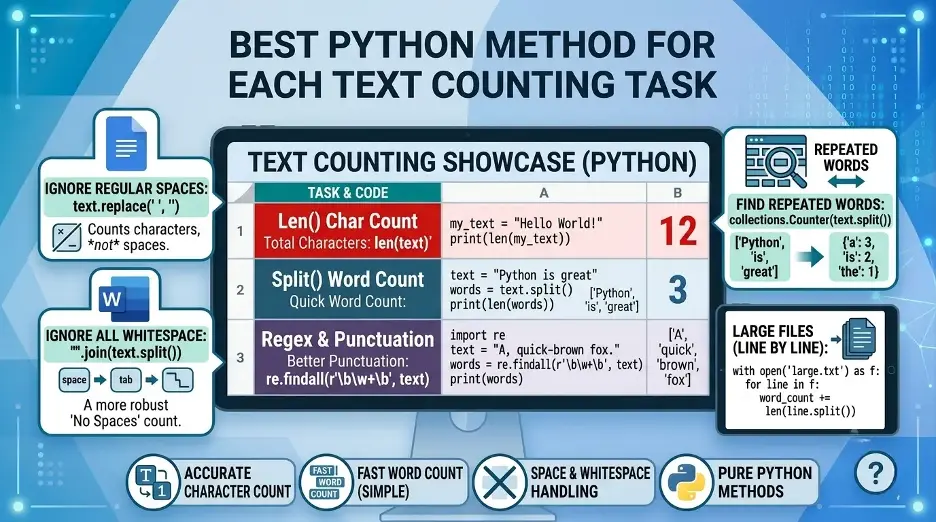
- Process more than one file using a Python script.
- Scan and use OCR software to work with the scanned document batch.
- Use document management software that can extract text.
When working on a big job like translating a document, or editing a book, reviewing legal documents, or auditing content, you can save a lot of time with batch processing.
Common Reasons Your PDF Word Count May Be Wrong
If your PDF word count is not accurate, then:
- The PDF has been scanned, but not OCRed.
- The text is in several columns.
- The tables are read in the reverse sequence.
- Headers and footers are counted on multiple occasions.
- There is some text embedded in an image.
- Hidden text layers are present in the PDF.
- The document is not using normal characters or character encoding.
- The tool does not recognize numbers, symbols and hyphenated words the same.
If correctness is a concern, check the results with two methods and check the extracted text.
Best Method for Different Users
Generally, Microsoft Word or Google Docs are the best options for students. Adobe Acrobat Pro or Word is useful in the office. OCR software is a must for scanned documents. Python provides greater control and automation for developers and researchers. If the document is not sensitive, then a word counter that is accessible on the internet in a PDF format can be used for quick checks.
Interesting Research Facts
Full citations are in Sources below.
PDFs are visual, not semantic
PDFs store page layout, fonts, and character positions rather than clear word, sentence, or paragraph structures. Tools must reconstruct words instead of simply reading built-in word data.
Source: Characterizing Word Counting in PDF Documents (JCDL)
Spacing affects word detection
PDF word counters rely on character spacing to decide where words start and end. Different fonts, layouts, and spacing rules can cause tools to merge words or split them incorrectly.
Source: Characterizing Word Counting in PDF Documents (JCDL)
Pre-processing changes the count
Text extraction tools may include or remove punctuation, numbers, symbols, codes, and names. These settings can make one tool’s word count different from another’s.
“Word” definitions vary
Counts can change depending on whether tools treat word forms, abbreviations, names, hyphenated terms, and word families as separate words or grouped items.
Source: Vocabulary size revisited: The link between vocabulary size and academic achievement
Complex layouts create noise
Tables, columns, sidebars, graphics, and multilingual content often confuse extraction tools, leading to inaccurate or corrupted text output. Manual or automated cleaning is often needed.
Frequently Asked Questions
1. What is the easiest way to count the number of words in a pdf?
The PDF text can be copied into a word counter, Google Docs, or Word. In the event that the PDF is to be scanned, run OCR first.
2. Does Microsoft Word allow you to count words in PDF?
Yes. Open the PDF in Word, let Word convert it, then click on Review > Word Count.
3. What is the reason for variation in word count of my PDF in different tools?
Depending on the tools, numbers, footers, headers and tables may be counted separately, which is normal and can be slightly different.
4. How to count the words in a PDF file that was scanned?
Take the scanned pages, use OCR to convert to readable text and then count words in Word, Google Docs or other editor.
5. Is there a way to count words in a PDF without having to download software?
Yes. Use Google Docs, or an online PDF word counter, but don't upload private or sensitive files.
6. How to count the number of words in several PDFs?
Use batch processing software, convert pdf to word files or use a script to extract and count the text for many pdfs.
7. Are there any pages in a pdf that I can't count?
Yes. You can only copy the pages or area you need and then paste into a word counter and view the result.
8. How to provide the most accurate word count of a PDF?
Microsoft Word is typically safe for selectable PDFs. The accuracy is higher with scanned PDFs, if the OCR is complemented by manual checking.
How we reviewed this article:
Share this article