How to Check Word Count on Mac?
Learn how to check word count on Mac using Pages, Word, Google Docs, TextEdit, Notes, Preview, and Terminal with simple steps.
Quick Summary
- On Mac, the word count can be easily told in writing applications such as Pages, Microsoft Word and Google Docs as they come with word count features.
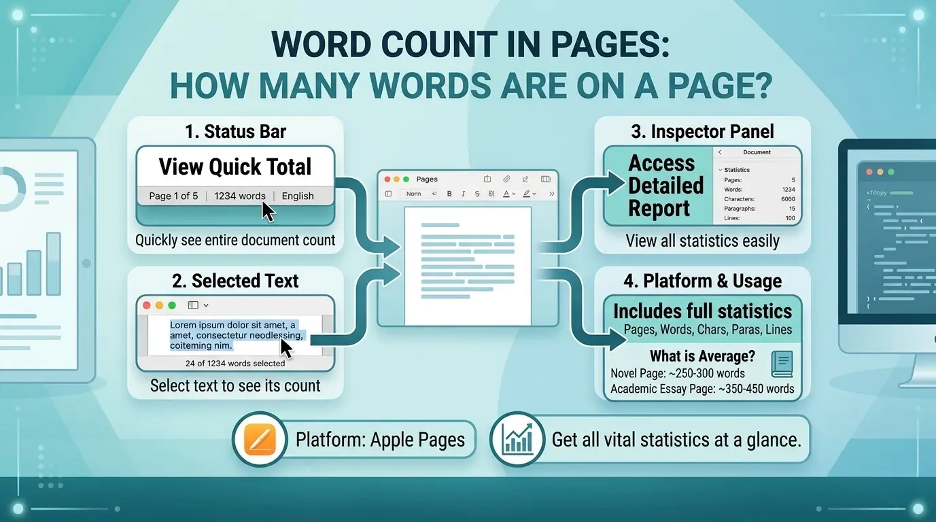
- The easiest way to check how many words, characters, paragraphs and pages are in the document I open in Pages is to go to the View menu and select Show Word Count.
- The word count can be viewed in the bottom status bar of Microsoft Word and can also be attained through Tools > Word Count in Microsoft Word for detailed statistics, such as pages, characters, lines, paragraphs, etc.
- You can go to the word count box in Google Docs by pressing Command + Shift + C, and you can enable word count as you are typing.
- If you want the word count in an app, you have to copy over to Pages, Word, Google Docs or use a plain text file in Terminal.
Where to Find Word Count on Mac?
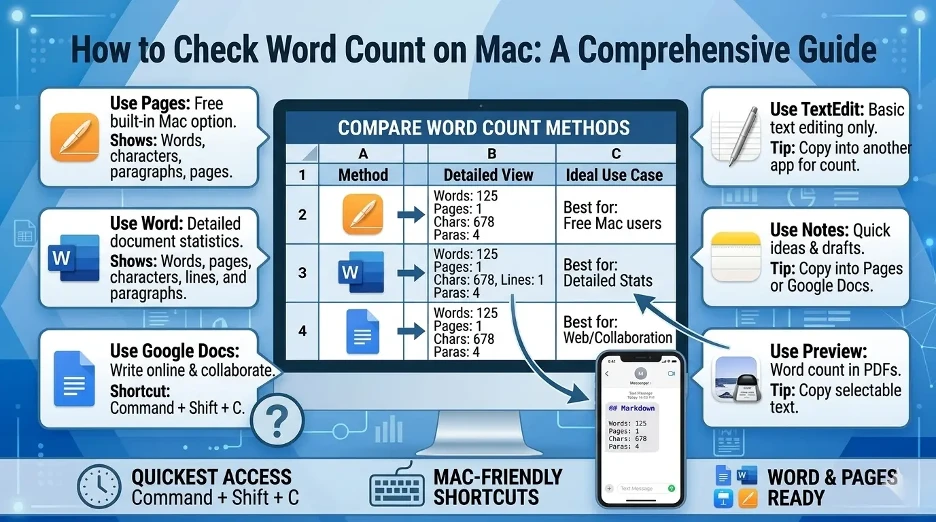
You can check word count on Mac by checking your word count within your writing application.
For example:
- To see the word count, click on View > Show Word Count in Pages.
- Check the bottom status bar or Tools > Word Count in MS Word.
- To select the entire document in Google Docs, select Command + Shift + C.
- Open TextEdit, and copy the text, and paste it into Pages, Word, or an online word counter.
- In Notes, drag and drop the note into an app that is word count supported.
I used the following word count methods across Macs in the Pages, Microsoft Word, Google Docs, TextEdit, Notes, Preview, and Terminal applications. My experience says Pages, Word and Google Docs are the simplest and most effective ones for counting words.
Let's now look at each method in turn.
How to Check Word Count in Pages on Mac?
Apple Pages feature a word count feature, which is one of the easiest ways to count words on Mac.
Steps to check word count in Pages:
- Open your document in Pages.
- From the top menu bar, click View.
- Click on Show Word Count.
- At the bottom of the document, there will be a word count box.
- Select words, characters, paragraphs, or pages by clicking on the word count box.
The total number of words is not the only thing that a page may display. You can also view:
- Copy the text and check the characters including spaces.
- Counting characters, excluding spaces.
- Paragraph count
- Page count
I like Pages best for most Mac users, because the word count is right there in the document.
How to check word count for selected text in Pages?
If you want to count only a part of the document:
- Select the text that you want to count.
- Check out the word count at the bottom.
- The word count will be displayed for the selected text on pages.
Useful for measuring the length of a single paragraph, section, introduction or excerpt.
How to Check Word Count in Microsoft Word on Mac?
Microsoft Word's word count feature is one of the most extensive on Mac.
Method 1: Use the status bar
- Open a document in Microsoft Word.
- View the bottom left corner of the window.
- The total word count should be displayed automatically.
If you choose any text, Word will display the count of selected text words vs the count of all document words. If you want detailed word, character, page, paragraph and line count statistics, I would recommend using Microsoft Word.
For example:
250 of 1,200 words
So, natively, this selection contains 250 words, and the entire document contains 1,200 words.
Method 2: Use the Word Count menu
- Open Word and open your document.
- In the menu bar, click on Tools.
- Select Word Count.
- A dialog box will show up with detailed statistics.
Typically Microsoft Word displays:
- Pages
- Words
- Characters without spaces
- Characters with spaces
- Paragraphs
- Lines
If you want more detailed writing statistics, this is the best choice.
How to Check Word Count in Google Docs on Mac?
While Google Docs does operate within a browser, it has a word count tool that is great for Macs.
Steps to check word count in Google Docs:
- Open your document in Google Docs.
- Click on Tools in the menu.
- Select Word count.
- The word count of the document will be displayed in a pop-up.
You can also use this keyboard shortcut:
Command + Shift + C
How to show word count while typing in Google Docs
Google Docs allows you to see how many words you're entering.
- Click the Word Count button to display the Word Count window.
- Select the box: Display word count while typing.
- Click OK.
A tiny little box with word count will be displayed in the lower left corner of the document. It can be clicked to get more details. I love Google Docs for online writing because you can easily check word count by using the command: Command + Shift + C.
How to Check Word Count in TextEdit on Mac?
There is no word count feature in TextEdit. There are workarounds, though, that allow you to find the word count.
Method 1: Copy text into Pages
- Open your document in TextEdit.
- Select all text by pressing Command + A.
- Copy it by pressing Command + C.
- Open Pages.
- Copy and paste the text with Command + V.
- Click on View > Show Word Count.
Method 2: Copy text into Google Docs
- Select all of the text in TextEdit and copy it.
- Open Google Docs.
- Copy and paste the text into a blank document.
- To open word count, press Command + Shift + C.
Method 3: Use an online word counter.
You can also copy and paste your TextEdit text into a word counter application in your browser. This is fast, but do not use the online tools for private, confidential or sensitive information.
I do not use the word count feature in TextEdit since it does not have a built-in counter.
How to Check Word Count in Notes on Mac?
There is no word count feature on Apple Notes. You can only see the word count of a note when you copy it to another app.
Steps:
- Open up the Notes app on Mac.
- Click on whatever note you wish to count.
- Select the note text with the arrow keys Command + A.
- Copy it by pressing Command + C.
Copy and paste it into Pages, Word, Google Docs or another word count app. Pages is the easiest for most Mac people as it is already offered with most Apple devices and is free. I tend to copy to Pages or Google Docs when I write something important in notes to see how many words it takes up.
How to Check Word Count in Preview on Mac?
The application of preview is widely-used to open PDFs on Mac, but it does not have a built-in word count feature.
To count the words in a PDF:
- Open the PDF in "Preview."
- To count, select the text you wish to count.
- Copy it by pressing Command + C.
- Copy and paste it into Pages, Word or Google Docs.
- Leverage word count function of that app.
This is best suited to PDFs that have text you can select. If the PDF is seen as an image, it might be necessary to use an optical character recognition (OCR) software before word counting can be done. I read PDFs in Preview, but I do not consider it a word counter. For a dedicated approach, see our guide on how to count words in a PDF file.
How to Check Word Count Using Terminal on Mac?
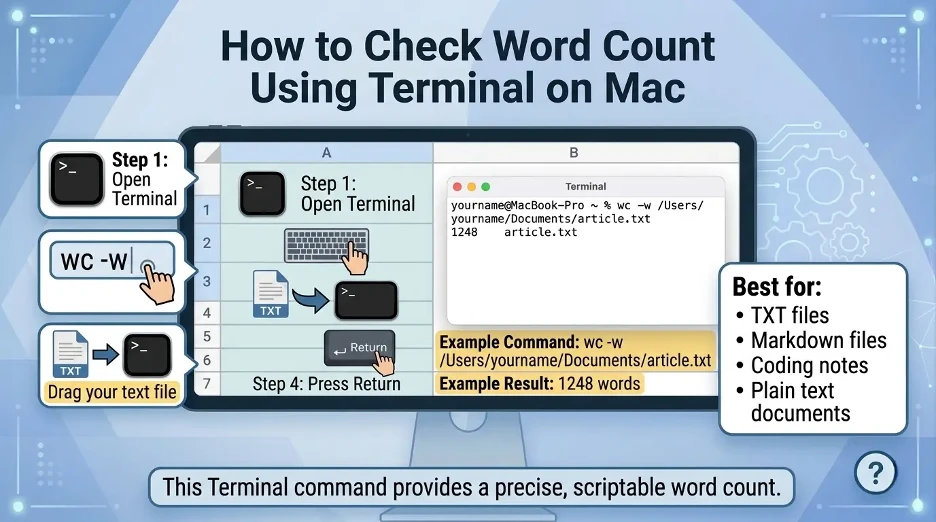
If you're at ease using Terminal, macOS has a command-line utility that you can use to count words in a text file.
Steps:
- Open Terminal.
- Type the following:
wc -wand then press space. - Drop your text file in the Terminal window.
- Press Return.
The command will be similar to this:
wc -w /Users/yourname/Documents/file.txtThe number of words in the file will be displayed in the terminal.
It works well with plain text files, coding projects, Markdown files, and writers that use text-based workflows. I only use Terminal for word counting when the file I'm looking at is in plain text, Markdown, or a coding document.
Best Apps for Checking Word Count on Mac
These are the most pragmatic possibilities:
| App | Built-in Word Count | Best For |
|---|---|---|
| Pages | Yes | General writing, essays, reports |
| Microsoft Word | Yes | Professional documents and academic writing |
| Google Docs | Yes | Cloud-based writing and collaboration |
| TextEdit | No | Simple text editing |
| Notes | No | Quick notes and drafts |
| Preview | No | Viewing PDFs |
| Terminal | Yes, with command | Plain text and Markdown files |
Why Does Word Count Matter?
Word count assists you to adhere to writing requirements and make your writing easier to read. It is particularly important for:
- School essays
- College assignments
- Blog posts
- SEO content
- Manuscripts
- Cover letters
- Meta descriptions
- Grant applications
- Social media posts
- Professional reports
When it comes to SEO writing, there's a balance between word count and content quality, as more words can mean a more comprehensive coverage of a topic. An informative and easy to understand 1,000 word article is better than a 2,000 word article that is repetitive.
Common Word Count Shortcuts on Mac
These are the most helpful shortcuts:
| App | Shortcut |
|---|---|
| Google Docs | Command + Shift + C |
| Select all text | Command + A |
| Copy text | Command + C |
| Paste text | Command + V |
| Open Spotlight | Command + Space |
Unlike Microsoft Word and Pages, there is not such a universal shortcut for word count, but it can be easily found in the menu bar. As I've experienced, Pages is the best free option, Word is best for detailed stats, and Google Docs is best for online writing.
Interesting Research Facts
Full citations are available in Sources below.
Word count can affect exam performance
Cambridge Assessment found a clear correlation between essay length and marks in GCSE exams, though quality matters more than quantity alone.
Source: How much do I need to write to get top marks? — Cambridge Assessment
Tracking writing goals improves consistency
Evidence for academic writing practices indicates that setting a structured writing routine with measurable word-count goals supports long-term writing productivity.
Source: Academic writing and publishing — Taylor & Francis Online
Small words make up a large share of writing
In a study of 50,000+ college essays, small function words — pronouns, articles, and prepositions — significantly shaped the overall composition and style of the text.
Source: Personality, Gender, and Age in the Language of Social Media — PLOS ONE
Typing speed helps estimate writing time
Research shows that typing speed varies considerably by keyboard type and experience, affecting how quickly a writer can reach a target word count.
Source: The effect of keyboard design on performance — Taylor & Francis Online
Real writing is slower than simple typing
Unlike copy-typing, real writing involves planning and revision. Cambridge data shows top GCSE candidates wrote around 15 words per minute in a 45-minute exam.
Source: Handwriting speed of GCSE candidates — University of Cambridge Repository
Frequently Asked Questions
Has Mac come with a word counter?
There's no word counter built into Mac, but there are apps such as Pages, Microsoft Word, Google Docs and Terminal that count words.
How to use the word count in Pages (Mac)?
Open the document, click View, and then click Show Word Count. The counter is shown at the bottom of the document.
Why can't I find the word count option in TextEdit?
There is no normal word count option in TextEdit. You can then copy the text into Pages, Word or Google Docs to count it.
How do you count words in Apple Notes?
There is no word counter in Apple Notes. It is easiest to copy your note into Pages or Google Docs.
What is the way to count words in a PDF file on Mac?
There is no word count in Preview. Duplicate the PDF and count the words in Pages, Word, or Google Docs. You can also see our full guide on counting words in a PDF file.
Does Terminal have the ability to count words on Mac?
Yes. To count the number of words in a plain text file use the following command in Terminal: wc -w. For TXT, Markdown and coding files.
Why is my Pages word count not showing?
If Word Count is enabled but not displayed, you can view it at the bottom of the document. Sometimes it is possible to get it to work again by restarting Pages or opening a new document.
How to easily find word count for Mac for free?
I'd suggest Pages since it's free for lots of Mac users and displays word count in the document window. Alternatively, use our free online word counter — no sign-up required and it works in any browser. You can also check how word count differs from character count.
How we reviewed this article:
Share this article