How to Count Words in a PDF File?
Understand how to accurately count words in PDF with Word, Google Docs, online PDF word counting tools, OCR, and more.
Quick Summary: How to Count Words in a PDF
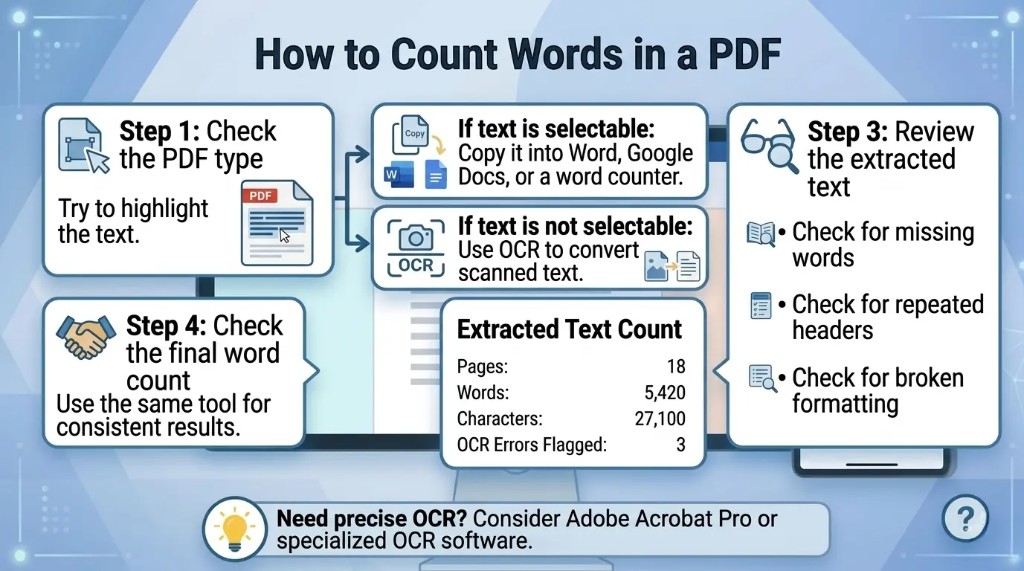
- Test if text is selectable
Try to highlight and copy text. If you can, the PDF is text-based and easier to count. If not, it is likely scanned and needs OCR. - Use Microsoft Word for a dependable count
Open the PDF in Word, allow conversion, then use Review → Word Count. See our Word count in Microsoft Word guide. - Free cloud option: Google Docs
Upload to Google Drive, open with Google Docs, then Tools → Word count. Details in our Google Docs word count guide. - Scanned PDFs need OCR
Scanned files store images, not selectable text. Convert with OCR before counting. - Verify extracted text
Always review pasted or converted text before trusting the final number—or paste into our free word counter for a second check.
What Is a PDF Word Count?
A PDF word count is the number of words in the text inside a PDF document—typically body text, headings, captions, footnotes, and tables, and sometimes headers or footers depending on the tool.
I treat any PDF word count as an approximation until I have checked the extracted text myself. Final numbers can vary by tool because of headers, footers, tables, footnotes, punctuation, numbers, hyphenation, and scanned pages.
Why Counting Words in a PDF Can Be Difficult
PDFs are not all built the same way. Some are exported from Word, Google Docs, or InDesign with selectable text. Others are scans stored as images.
The main challenges are:
- Scanned PDFs without OCR have no readable text to count.
- Complex layouts (columns, sidebars) confuse extraction.
- Tables, footnotes, headers, and captions change totals.
- Password-protected files may block copy or export.
- Online tools may misread formatting or special characters.
First, try to highlight and copy text with your cursor. If you cannot select words, assume the file is scanned and plan for OCR before counting.
Method 1: Copy and Paste the PDF Text into a Word Counter
For short, text-based PDFs, copy the text and paste it into an online word counter, Microsoft Word, or Google Docs. Review the pasted text for missing lines or repeated headers before trusting the count.
- Open the PDF.
- Select the text to count and copy it.
- Paste into a word processor or our free word counter.
- Check the word count and verify the paste looks complete.
Method 2: Count Words in a PDF Using Microsoft Word
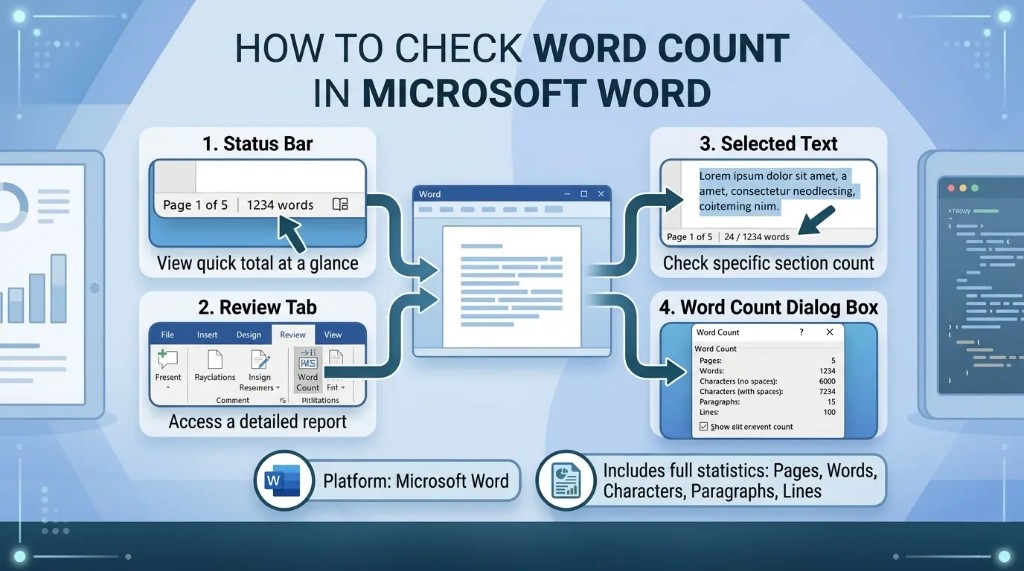
Word can open many PDFs and convert them to an editable document, then show pages, words, characters, paragraphs, and lines in the Word Count dialog.
- Open Microsoft Word.
- Click File → Open and choose your PDF.
- Click OK when Word offers to convert the file.
- Click Review → Word Count.
For tables or multi-column layouts, compare the converted document to the original PDF. Step-by-step details: how to check word count in Microsoft Word.
Method 3: Count Words in a PDF Using Google Docs
- Upload the PDF to Google Drive.
- Right-click the file → Open with → Google Docs.
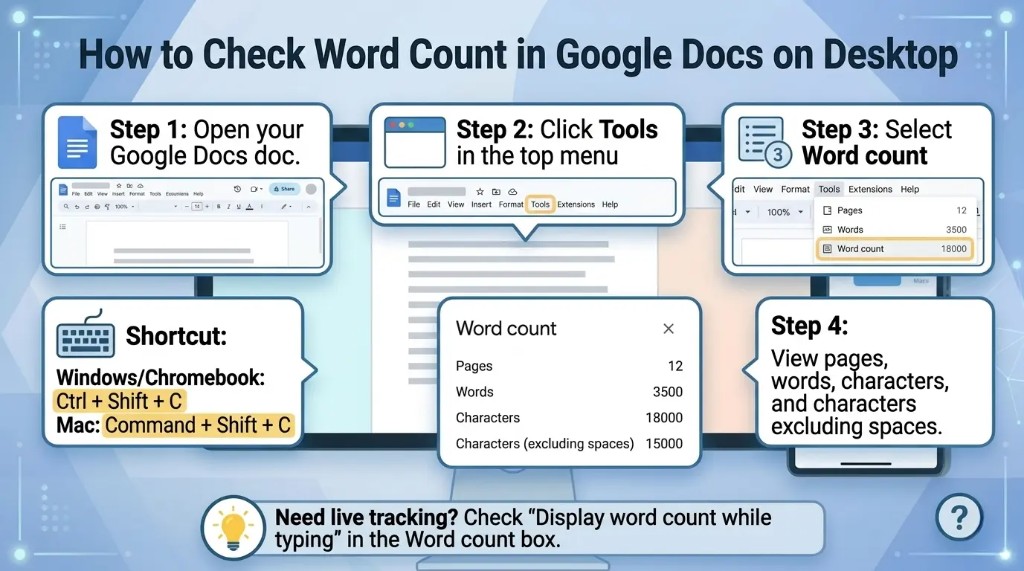
- Click Tools → Word count.
Shortcuts: Ctrl + Shift + C (Windows) or Command + Shift + C (Mac). More: Google Docs word count guide.
Method 4: Use Adobe Acrobat Pro to Export the PDF
Acrobat Pro does not always show word count directly. Export to Word, then count there.
- Open the PDF in Adobe Acrobat Pro.
- Click Export PDF and choose Microsoft Word.
- Save and open the file in Word.
- Go to Review → Word Count.
Method 5: Use an Online PDF Word Counter
Online PDF word counters upload your file and return a count quickly. I only use them for non-sensitive documents. For private, legal, financial, or business PDFs, prefer offline tools.
- Find a reputable online PDF word counter.
- Upload the PDF and wait for processing.
- Review the count and download or copy results if needed.
Method 6: Use OCR for Scanned PDFs
Scanned PDFs need optical character recognition (OCR) to turn images into text before counting. Verify recognized text—skewed or low-quality scans often lose words.
- Open the scan in OCR software.
- Run OCR on the document.
- Export recognized text to Word, Google Docs, or plain text.
- Count words in your editor of choice.
Common tools include Adobe Acrobat Pro, Google Drive OCR, ABBYY FineReader, Microsoft OneNote, and dedicated online OCR services.
Method 7: Count Words in a PDF on Mac
Preview has no built-in word count. Select text in Preview, copy it, and paste into Pages, TextEdit, Word, or an online counter.
- Open the PDF in Preview.
- Select and copy the text.
- Paste into a word counter and verify the result.
Method 8: Count Words in a PDF on Windows
Quick option if Word is installed:
- Right-click the PDF → Open with → Microsoft Word.
- Allow Word to convert the file.
- Click Review → Word Count.
Which PDF Word Count Method Is the Most Accurate?
Accuracy depends on document type:
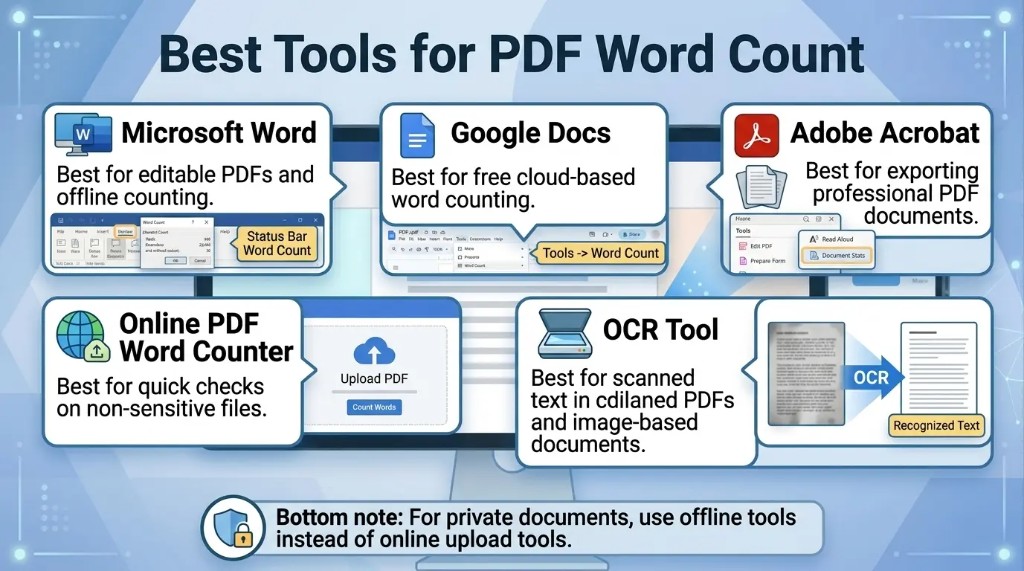
| Method | Best for | Accuracy |
|---|---|---|
| Copy and paste | Short text-based PDFs | Good |
| Microsoft Word | Editable text PDFs | Very good |
| Google Docs | Cloud workflows | Good |
| Adobe Acrobat export | Professional documents | Very good |
| Online PDF counter | Fast, simple checks | Varies |
| OCR software | Scanned PDFs | Depends on scan quality |
Tips for Getting an Accurate PDF Word Count
- Confirm text is selectable before choosing a method.
- Use OCR for scans, then review recognized text.
- Remove duplicate headers and footers when they should not count.
- Decide whether tables, captions, references, and footnotes belong in the total.
- Use the same tool each time for consistent comparisons.
- Keep confidential documents offline.
- For formal submissions, confirm what sections count toward the limit.
How to Count Words in a Password-Protected PDF
Protected PDFs may block copy, export, or analysis. You need lawful access first. Enter the password, request an unlocked copy, or ask the owner to export text. Do not bypass restrictions on documents you are not allowed to use.
It depends on the tool and your assignment rules. Some counters include headers, footers, page numbers, captions, footnotes, and tables; others skip them. For academic, legal, publishing, or client work, verify the required guidelines—for example, a school may exclude references while a translation brief counts all visible text.
How to Count Only Selected Text in a PDF
- Select only the pages or passage you need.
- Copy the selection.
- Paste into Word, Google Docs, or a word counter.
- Clean up formatting and read the count.
Useful when cover pages, references, appendices, or tables should stay out of the total.
How to Count Words in Multiple PDF Files
For many files, consider:
- Batch PDF processing or OCR software
- Converting each PDF to Word and counting separately
- A script (e.g. Python) to extract and tally text
- Document management tools with text extraction
Batch workflows save time on translation, editing, legal review, and content audits.
Common Reasons Your PDF Word Count May Be Wrong
- The PDF is scanned but not OCRed.
- Multi-column text is read in the wrong order.
- Headers and footers are counted multiple times.
- Text inside images is missed.
- Hidden text layers or unusual encoding confuse the tool.
- Numbers, symbols, and hyphenated words are counted differently.
When accuracy matters, compare two methods and inspect the extracted text.
Best Method for Different Users
- Students: Microsoft Word or Google Docs
- Office workers: Word or Adobe Acrobat Pro
- Scanned documents: OCR plus manual review
- Developers and researchers: Scripted extraction for control
- Quick non-sensitive checks: Online PDF word counters
Interesting Research Facts
Full citations are in Sources below.
PDFs are visual, not semantic
PDFs store page layout, fonts, and character positions rather than clear word, sentence, or paragraph structures. Tools must reconstruct words instead of simply reading built-in word data.
Source: Characterizing Word Counting in PDF Documents (JCDL)
Spacing affects word detection
PDF word counters rely on character spacing to decide where words start and end. Different fonts, layouts, and spacing rules can cause tools to merge words or split them incorrectly.
Source: Characterizing Word Counting in PDF Documents (JCDL)
Pre-processing changes the count
Text extraction tools may include or remove punctuation, numbers, symbols, codes, and names. These settings can make one tool’s word count different from another’s.
“Word” definitions vary
Counts can change depending on whether tools treat word forms, abbreviations, names, hyphenated terms, and word families as separate words or grouped items.
Source: Vocabulary size revisited: The link between vocabulary size and academic achievement
Complex layouts create noise
Tables, columns, sidebars, graphics, and multilingual content often confuse extraction tools, leading to inaccurate or corrupted text output. Manual or automated cleaning is often needed.
Frequently Asked Questions: PDF Word Count
1. What is the easiest way to count words in a PDF?
Copy selectable text into a word counter, Word, or Google Docs. For scans, run OCR first.
2. Does Microsoft Word count words in a PDF?
Yes. Open the PDF in Word, allow conversion, then use Review → Word Count.
3. Why does my PDF word count vary between tools?
Tools differ on headers, footers, tables, numbers, and hyphenation. Small differences are normal.
4. How do I count words in a scanned PDF?
Use OCR to create readable text, review the output, then count in Word, Google Docs, or another editor.
5. Can I count words in a PDF without downloading software?
Yes—Google Docs or online counters work for non-sensitive files. Avoid uploading private documents.
6. How do I count words in several PDFs?
Use batch OCR or conversion tools, convert each file to Word, or script text extraction across files.
7. Can I count only part of a PDF?
Yes. Select and copy only the pages or sections you need, then paste into a word counter.
8. What is the most accurate PDF word count method?
Microsoft Word is reliable for selectable text PDFs. Scanned PDFs need quality OCR plus manual checking for the best accuracy.